Getting Started as an Administrator
Welcome to the HyperStudy platform's administrator guide. As an administrator, you have full control over the platform, including user management, system settings, and oversight of all experiments. This guide will help you get started with your administrative responsibilities.
Types of Administration
HyperStudy has two levels of administration:
Platform Administrators (This Guide)
Platform administrators have full system access across the entire HyperStudy installation:
- Manage all user accounts and platform-wide permissions
- Oversee all organizations on the platform
- Access system health monitoring and logs
- Configure platform-wide settings
- Handle deployment and infrastructure
Organization Administrators
Organization administrators manage their organization only:
- Invite and manage team members
- Assign roles within their organization (Admin, Member, Guest)
- Monitor organization usage and quotas
- Configure organization settings and branding
For organization administration, see the Organizations Guide in the Experimenter section.
Platform Administrator Responsibilities
As a platform administrator, you're responsible for:
- Managing user accounts and platform-wide permissions
- Overseeing all organizations and their usage
- Managing media resources and storage
- Monitoring system health and performance
- Configuring system settings
- Managing experiment rooms
- Handling data storage and backups
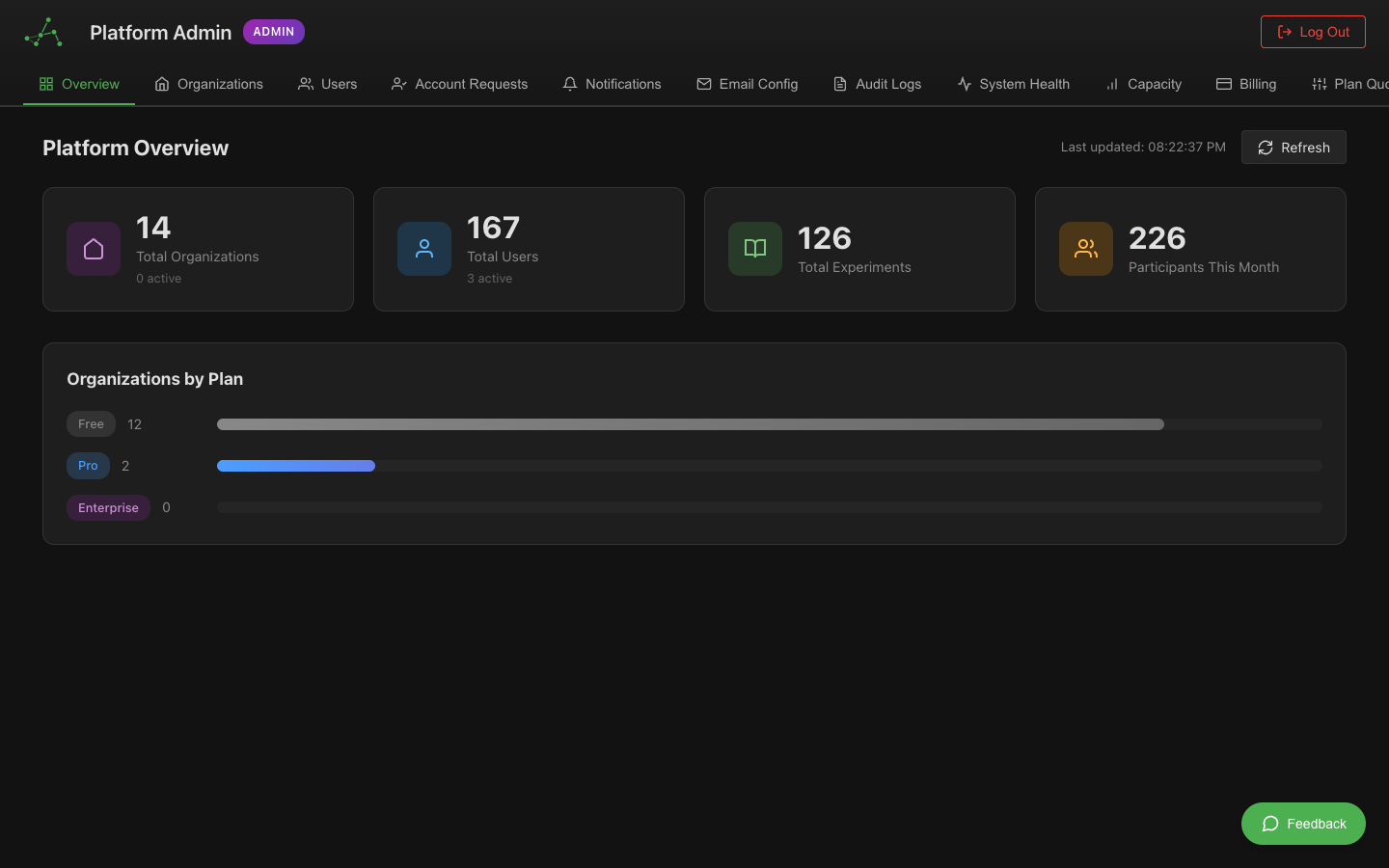 The admin dashboard showing monitoring, user management, and system controls
Accessing the Admin Dashboard
- Log in with your administrator account
- Navigate to the Administrator Dashboard via:
- Direct URL:
https://[your-installation-url]/admin - Navigation menu: Click your profile and select "Admin Dashboard"
- Direct URL:
- Verify that you see the full admin interface with all control panels
If you don't see admin controls, your account may not have administrator privileges.
Dashboard Overview
The Admin Dashboard consists of several key sections:
Users Panel
Manages all user accounts on the platform:
- View, create, and edit user accounts
- Assign and modify user roles
- Reset passwords and manage account issues
- Approve or deny experimenter role requests
Experiments Panel
Oversees all experiments on the platform:
- Browse all experiments, regardless of creator
- View experiment details and configurations
- Monitor active experiments
- Manage experiment permissions and sharing
Media Panel
Controls media resources:
- Manage the video library
- Organize and categorize images
- Review and approve media uploads
- Monitor storage usage
Initial Administration Tasks
When setting up or maintaining the platform, prioritize these tasks:
1. User Account Setup
- Create accounts for key administrators
- Set up authentication policies
- Configure password requirements
- Establish account recovery procedures
2. Role Configuration
- Review the default role permissions
- Adjust role capabilities if needed
- Create any custom roles required for your organization
- Document role definitions and permissions
3. Storage Management
- Configure storage locations for recordings
- Set up backup procedures
- Establish retention policies
- Monitor storage usage
4. Email Configuration
- Set up email notifications
- Configure email templates
- Test email delivery
- Establish notification preferences
5. Security Review
- Review access controls
- Check authentication methods
- Verify data encryption settings
- Test backup and recovery procedures
User Management Basics
User management is one of your most important responsibilities:
Understanding User Roles
The platform has three primary roles:
- Administrator: Full system access and control (you are here)
- Experimenter: Can create and run experiments
- Participant: Can join experiments they're invited to
Each role has different permissions and capabilities.
Managing Users
To view and manage users:
- Go to the Users panel in the Admin Dashboard
- Use the search and filter options to find specific users
- Click on a user to view their details
- Use the action buttons to edit, disable, or delete accounts
Approving Experimenter Requests
When users request experimenter privileges:
- You'll receive a notification in the dashboard
- Go to the "Pending Approvals" section
- Review the requestor's information and stated purpose
- Click "Approve" or "Deny" based on your organization's policies
Set clear criteria for who should receive experimenter privileges.
Experiment Oversight
As an administrator, you can monitor and manage all experiments:
Viewing Experiments
- Go to the Experiments panel
- Browse the list of all experiments on the platform
- Use filters to find specific experiments
- Click on an experiment to view details
Managing Experiment Settings
For each experiment, you can:
- View the complete configuration
- Monitor participant assignments
- Check synchronization settings
- Review data collection configuration
Handling Problematic Experiments
If you need to intervene with an experiment:
- Contact the experimenter first, if possible
- Temporarily disable the experiment if necessary
- Make required changes or request the experimenter to do so
- Document the issue and resolution
System Monitoring
Keep an eye on system health:
Performance Tracking
- Review the system dashboard regularly
- Check server load, memory usage, and storage
- Monitor network traffic, especially during peak usage
- Look for performance degradation over time
Error Monitoring
- Check error logs regularly
- Investigate recurring errors
- Prioritize user-facing issues
- Document common issues and their resolutions
User Activity
- Monitor login patterns
- Track resource usage by user
- Identify unusual access patterns
- Review session recordings if suspicious activity is detected
Best Practices
Follow these guidelines for effective administration:
- Regular Backups: Ensure all data is backed up regularly
- Documentation: Keep records of all system changes
- User Communication: Inform users of important changes or maintenance
- Principle of Least Privilege: Grant only the permissions users need
- Regular Audits: Periodically review user accounts and permissions
- Stay Updated: Keep the platform and all components updated
- Testing: Test major changes in a non-production environment first
Getting Help
If you encounter issues:
- Check the administrator documentation
- Review known issues in the system logs
- Consult the troubleshooting guide
- Contact technical support at [support email]
Next Steps
Now that you understand the basics, explore these topics in depth: