Custom Agent Endpoints
Run HyperStudy agents on your own hardware — a Mac, a workstation GPU, or a DGX Spark — instead of a cloud provider. This keeps inference local (useful for data-governance requirements), costs nothing per token, and lets you study open-weight models.
The hyperstudy-agent CLI does the heavy lifting: it detects your hardware, launches a properly configured llama-server (llama.cpp), proves the endpoint meets HyperStudy's contract, and exposes it publicly so you can paste the URL straight into HyperStudy Settings.
Install the CLI
Or use the install script (downloads the right binary into /usr/local/bin):
curl -fsSL https://raw.githubusercontent.com/hyperstudyio/hyperstudy-agent/main/install.sh | bash
Building from source (Go 1.26+) is also supported — see the repository README.
Prerequisites: serve needs llama-server (brew install llama.cpp on macOS; see Hardware notes for Linux/GPU builds). tunnel needs cloudflared (brew install cloudflared). Check your install with hyperstudy-agent --version.
Quickstart
Three commands: serve a model, verify the endpoint, tunnel it to the internet.
1. Serve
hyperstudy-agent serve
This detects your hardware, picks an appropriate model (downloading it on first run), generates an API key (prefix hsa_, saved to ~/.hyperstudy-agent/config.json and reused across restarts), and starts llama-server with authentication enabled. When it prints READY, note the baseUrl and API key.
Useful flags: --model (preset name like qwen3.6-moe / gemma4-moe / gemma4-4b, or any raw -hf reference), --port (default 8080), --parallel (default 8), --ctx (default 32768), --regenerate-key, and --mtp (lossless speculative decoding for the gemma4 presets, 1.4–2.3× faster). See the model overrides guide for details and hardware-specific recommendations.
2. Verify
hyperstudy-agent verify
Runs four checks against HyperStudy's endpoint contract:
- Reachable —
GET /modelsanswers with an OpenAI-compatible shape - Auth enforced — a deliberately wrong key is rejected with 401
- Tool calling — the model successfully calls a
respondtool with schema-valid JSON arguments - Concurrency — p50/p95 latency under parallel load fits HyperStudy's timeout budget
If any check fails, verify prints the reason and exits non-zero. Every failure message maps to a row in the troubleshooting table.
3. Tunnel
hyperstudy-agent tunnel
Wraps a Cloudflare quick tunnel and prints a public https://….trycloudflare.com/v1 URL. Quick tunnels get a new hostname on every restart — for a stable hostname use Tailscale Funnel instead (tailscale funnel 8080 publishes a fixed https://<machine>.<tailnet>.ts.net URL).
If HyperStudy and your server are on the same local network (e.g., a lab deployment), the LAN baseUrl printed by serve may be enough and no tunnel is needed.
4. Connect to HyperStudy
- Go to Settings → API Keys → Custom Agent Endpoint.
- Paste the Base URL (from
tunnel, or the LAN URL fromserve) and the API key. - Optionally set a Generate timeout (10–300 seconds) if your hardware needs more than the 60-second default per request.
- Click Test connection.
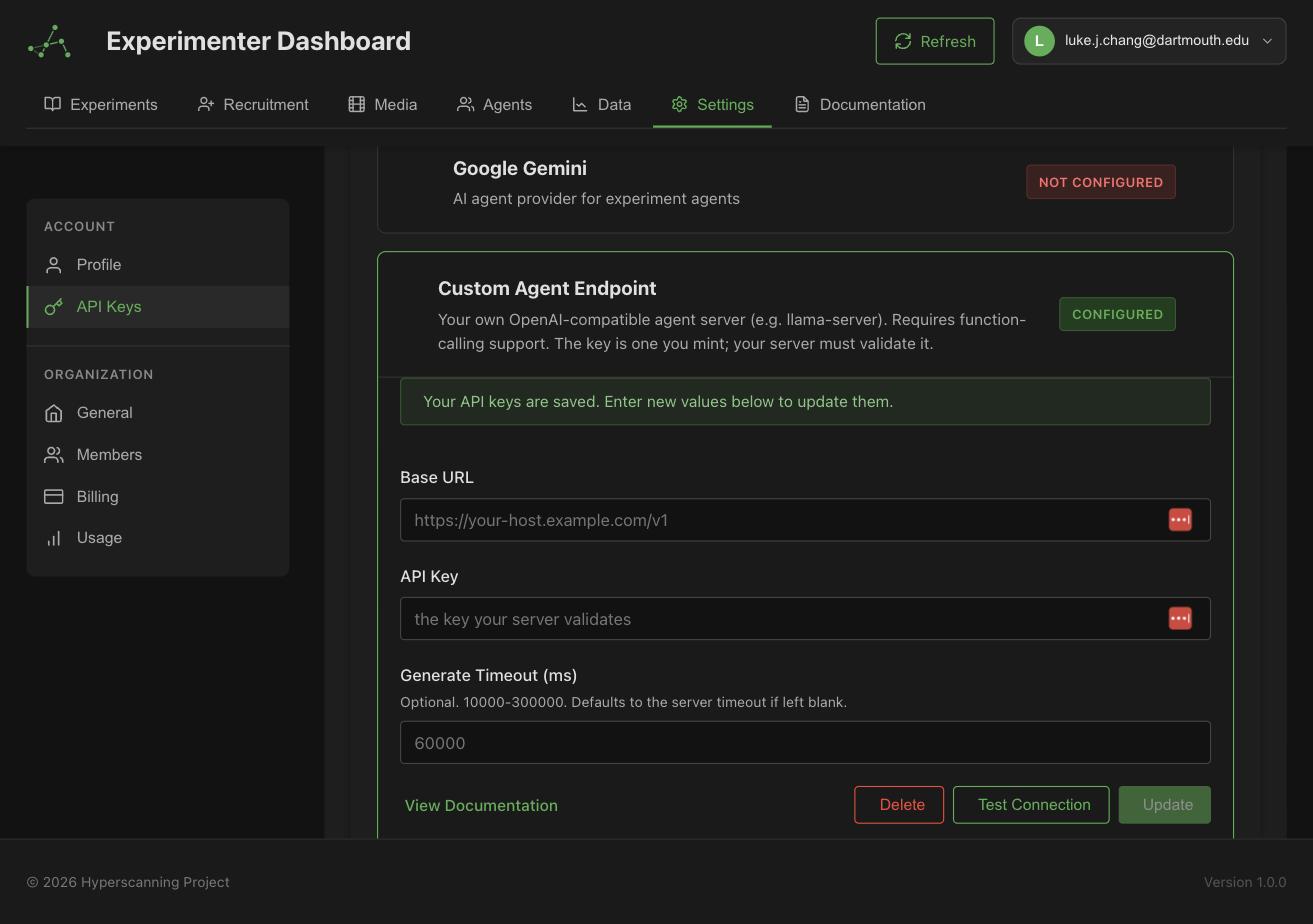
Then, in your agent's Model & Guardrails tab, set the provider to Custom and enter the model name — the model field is required for custom endpoints.
The endpoint contract
If you'd rather bring your own server than use the CLI, it must satisfy this contract:
- OpenAI-compatible
/v1/chat/completionswith function calling. Every HyperStudy agent turn submits its response as arespondtool call, not free text — a model or server that never returnstool_callscannot be used, regardless of text quality. - Bearer-token auth enforced on completion endpoints (
Authorization: Bearer <key>). - Timeouts: HyperStudy's budget is 60 s default / 300 s max per request, including under concurrent load.
- Public or LAN-reachable HTTPS/HTTP URL. Private-network and loopback addresses are rejected by HyperStudy's server-side URL policy when the platform is hosted (hosted HyperStudy cannot reach your
localhost) — that's what the tunnel is for.
Ollama doesn't enforce inbound auth, silently drops tool_choice, serializes requests by default, and truncates context without warning. Use llama-server, or front Ollama with a reverse proxy that adds real auth. mlx-lm similarly has no built-in auth — don't expose it directly.
Privacy note
When a custom endpoint powers an agent, the full experiment perception payload — including other participants' chat messages and experiment state — is sent to the machine running the server. Only run it on hardware you trust, and treat the generated API key as a credential to your experiment data.
Troubleshooting
Each row corresponds to a verify failure message:
| Failure message | What it means | Fix |
|---|---|---|
endpoint unreachable | Nothing is listening at --base-url | Confirm serve is running and the port matches |
GET /models returned N — not an OpenAI-compatible baseUrl? | The URL doesn't speak the OpenAI API shape | Check the URL includes /v1 and points at llama-server |
a WRONG key was accepted | The server ignores Authorization | You're likely running bare Ollama or forgot --api-key; serve configures this automatically |
chat/completions returned N | The completions endpoint errored | Check server logs; often out-of-memory or a bad model load |
endpoint rejected the API key | Wrong key (not a model problem) | Pass the correct --api-key, or re-run serve to print the saved key |
no tool_calls in response | The model replied with plain text | The model doesn't support tool calling or its chat template is broken; try a Qwen3 GGUF from unsloth, or update llama.cpp |
tool_calls arguments are not valid JSON / schema mismatches | Malformed or wrong-typed tool arguments | Try a different quant or a larger model; increase --ctx if the schema is truncated |
request failed under load | A request failed during the parallel concurrency test | Raise --parallel, or check memory pressure under load |
exceeds the platform's 300s maximum timeout | p95 latency is over the hard cap | Smaller/faster model, less concurrency, or more compute |
above the 60s default; raise the credential's timeoutMs | Passes, but slower than the default budget | Optionally raise the Generate timeout on the credential in Settings |
For hardware-specific setup (CUDA builds, DGX Spark source build, model presets, Gemma 4 tool-calling notes), see the repository README.
Release Notes
v0.2.0
Released: 2026-07-17
Changelog
- 0e9794c7192409d9138b6edf6186ac415d7a3eb1 chore: rename repo to hyperstudyio/hyperstudy-agent; add changelog and docs release-notes sync
v0.1.3
Released: 2026-07-15
serve --mtp: speculative decoding (multi-token prediction) for the Gemma 4 presets — lossless, 1.4–2.3× faster generation- Removed the deprecated
serve --no-thinkingflag
v0.1.2
Released: 2026-07-14
serve --no-thinking: disable reasoning-model thinking for faster turns
v0.1.1
Released: 2026-07-14
serveoutput clarifies that the LAN URL is local-network-only and steers users totunnelfor hosted HyperStudy
v0.1.0
Released: 2026-07-14
Initial release.
serve: hardware detection (RAM, NVIDIA VRAM, DGX Spark), automatic model-tier selection, named model presets, API-key generation and persistence, readiness pollingverify: four contract checks — reachability, auth enforcement, tool calling via therespondtool, concurrency latency (p50/p95)tunnel: public HTTPS URL via a Cloudflare quick tunnel- Install script and prebuilt binaries for macOS (Apple Silicon) and Linux (x86_64, ARM64)
Release notes are automatically synced from GitHub releases.