Randomizing Order and Durations
On the V2 runner you can shuffle the order of trials and of the states inside a trial, keep some states fixed in place, and give a state a duration drawn at random, such as a jittered fixation cross.
Every room draws its order and durations once, from a recorded seed. Everyone in a room, people and AI agents alike, sees the same order and the same durations, and the data records exactly what each room ran.
Clusters and random variables need the V2 runner, which new experiments use. The legacy runner ignores them and shuffles each participant's order instead. See Legacy runner below.
Turning it on
In the experiment's settings, on the General tab, open Randomization and check Randomize state order. The clusters and Sample an order appear under it, and each state and group row in the state list gets a cluster tag.
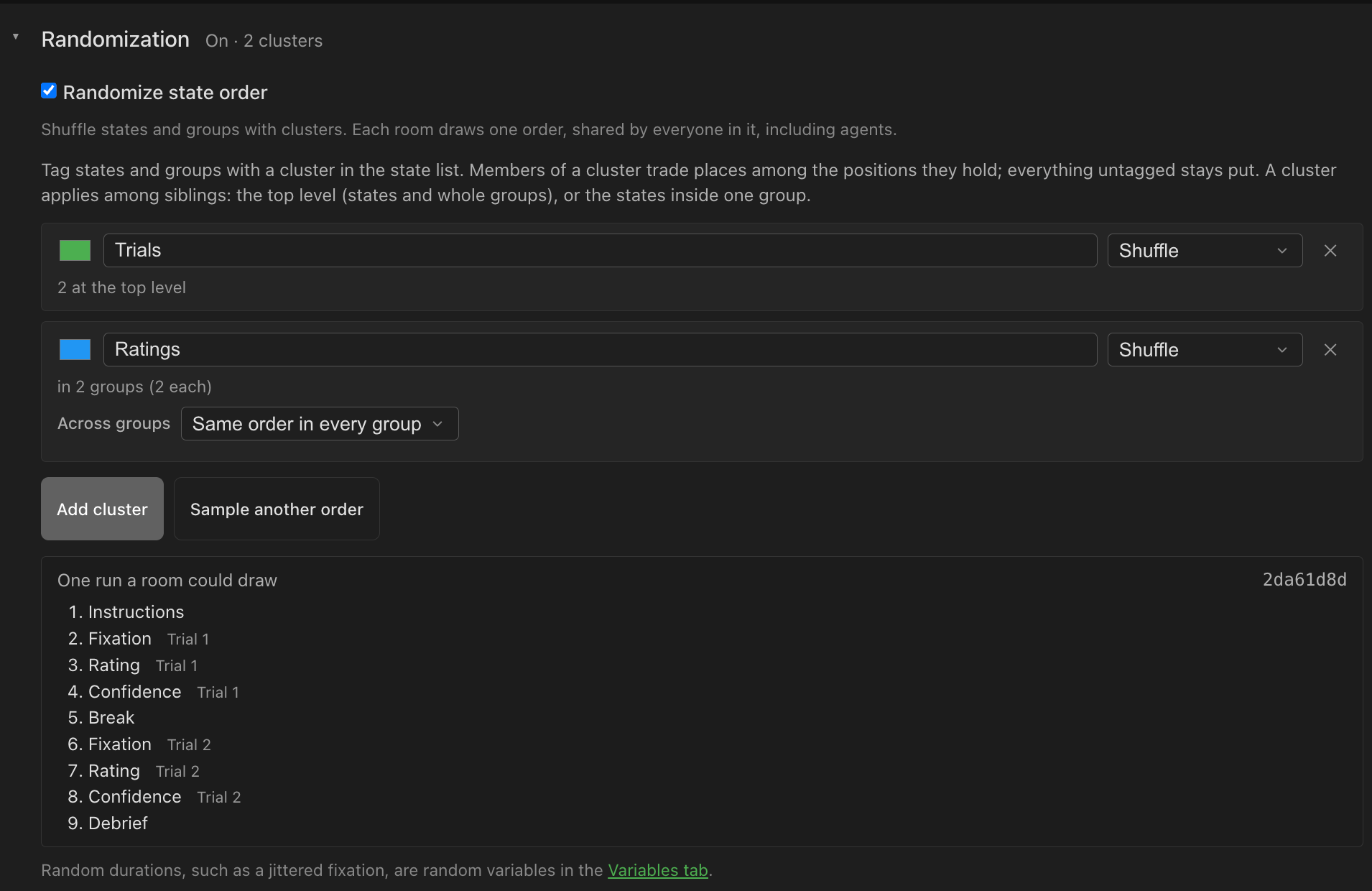
Unchecking it hides them and every room runs the states in the order listed. Your clusters and tags are kept, so checking it again brings them back as they were. They are still checked when you save: an edit that would break a hidden cluster (removing a state from a group whose cluster uses Same order in every group, say) is refused, and the message tells you to turn the setting on to fix the cluster.
Random durations don't depend on this setting: a state whose duration is drawn from a random variable draws it either way.
Clusters: what gets shuffled
You randomize by putting states or groups in a cluster. Add clusters under Randomize state order, then pick one in a state's or group's cluster tag (or No cluster). A tag is outlined in its cluster's colour.
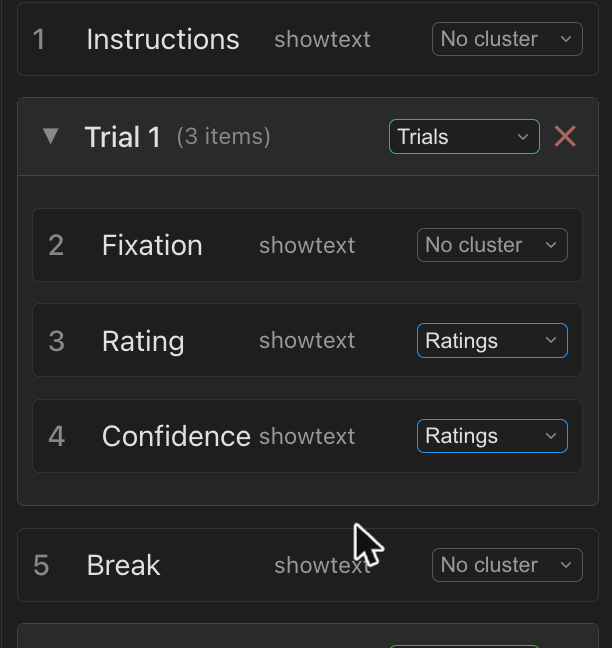
The rules:
- Members of a cluster trade places among the positions they hold. Everything that isn't in a cluster stays where it is, so states are fixed unless you put them in a cluster. Members don't have to be next to each other: trials can shuffle around a fixed Break screen without moving it.
- A cluster applies among siblings. Siblings are either the top-level items (single states and whole groups), or the states inside one group.
- A group in a cluster moves as one unit. Its states keep their order, unless they are in a cluster of their own.
- States in the same cluster inside one group are shuffled within that group.
Each cluster has a rule:
| Rule | What it does |
|---|---|
| Shuffle | A random order, drawn for each room. |
| Keep listed order | No shuffling. Use it to switch a cluster off while piloting, without removing its tags. |
A cluster with only one member at a level has nothing to trade places with. The panel warns about it.
The same cluster inside several groups
When you use one cluster inside several groups, for example a pair of ratings inside every trial group, the cluster shows an Across groups setting:
- Reshuffle in each group (the default): each group gets its own order. Trial 1 may run the ratings A then B, and trial 2 B then A.
- Same order in every group: the room draws one order and every group uses it. If trial 1 runs its second rating first, so does every other trial. This needs every group to have the same number of states in the cluster; the option is unavailable until they do.
Check it with Sample an order
Sample an order shows one run a room could draw, with any drawn durations, from a random seed. It follows your edits, so you can change clusters and watch the result. Sample another order draws a new seed.
Example: shuffle trials around a fixed break
You have six trial groups, a break in the middle, and instructions and a debrief that must stay first and last:
Instructions
Trial 1 (group)
Trial 2 (group)
Trial 3 (group)
Break
Trial 4 (group)
Trial 5 (group)
Trial 6 (group)
Debrief
- In the experiment's settings, on the General tab, open Randomization and check Randomize state order. Click Add cluster and name it
Trials. Leave the rule on Shuffle. - Set the cluster tag of the six trial groups to
Trials. Leave Instructions, Break and Debrief on No cluster. - Click Sample an order. The six trials appear in a random order in the six trial positions, with the Break still fourth and the instructions and debrief in place.
Each trial group keeps its own states in order. To also shuffle states within each trial, add a second cluster and tag those states with it.
Random durations: jittering a fixation
A Timer (TIMED) state's duration can be Fixed or Drawn from a random variable. You define random variables in the Variables tab.
- In the Variables tab, click Add random variable and name it
fixationJitter. - Keep the distribution Uniform and set Min to
2000and Max to6000. The summary under it shows the average,Average 4,000. - Keep New value for each state, so every fixation gets its own value.
- Select each fixation state and open its Transition tab. Set Transition Type to Timer - Auto-advance after duration, set Duration to Drawn from a random variable, and pick
fixationJitterunder Random variable.
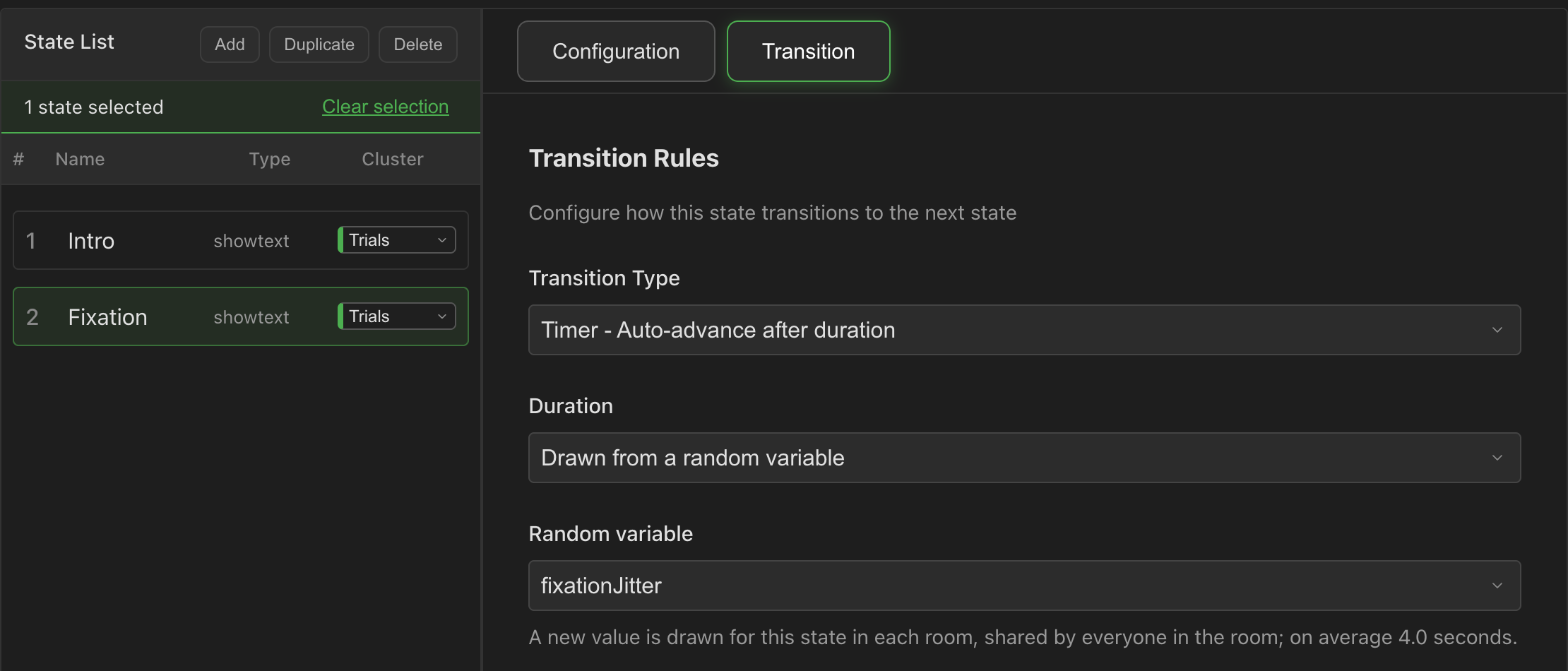
Each fixation now lasts between 2 and 6 seconds, drawn when the room starts. Show the drawn value in the state's text with {fixationJitter} if you need to check it while piloting.
Distributions
| Distribution | Settings | Notes |
|---|---|---|
| Uniform | Min, Max | Every value between the bounds is equally likely. |
| Normal | Mean, SD, Min, Max | Cut at the bounds. A duration needs both bounds. |
| Exponential | Mean above min, Min, Max | Min plus an exponential with that mean, cut at Max. A duration needs Max. The summary shows the resulting average. |
| List of values | Values, Draw | Values from your list, for example 2000, 3000, 4000. |
A list draws in one of three ways:
- Shuffled, each value once before repeats: like dealing a deck. Seven trials with a seven-value list get every value once.
- At random, with repeats.
- In list order.
Durations are whole milliseconds and can't be negative. A list used as a duration must hold numbers.
How often a value is drawn
- New value for each state: a fresh value every time a state uses the variable. A state that runs twice (it is in two groups, say) draws twice.
- One value per room: one value for the whole room, shared by every state that uses it and available in text from the start.
A "new value for each state" variable is drawn only for the Timer durations that use it. One that no duration uses is never drawn, and the Variables tab warns about it. To show a value that stays fixed for the whole room, use One value per room.
Preview
Preview randomizes exactly like a real room, with a fresh seed each time you click Restart. When the experiment randomizes anything, the control bar shows the order's seed (for example Order 3f9a1c2e). Replay order restarts with that same seed, so you can step through the same order and durations again while you fix something.
In your data
- The plan: each room records a
session.planevent with its seed, the order its states ran in, how each cluster was shuffled, and every drawn value. - Drawn values: each drawn value is also recorded as a variable update when its state starts, so it appears with the room's other variables in Data Management.
- Edits while rooms are running: a room runs the experiment as it was when the room started, with the order and durations it drew.
What is and isn't shared across a room
Clusters and random variables are drawn once on the server, so the whole room shares them. Two older features draw separately in each participant's browser, so participants in the same room can get different values:
- the template functions
random()andsample()in text; - stimulus mappings with Draw Scope set to Per-Participant.
Use a random variable when everyone in a room must see the same value.
Legacy runner
On the legacy runner:
- the same setting reads Randomize state order for each participant. Each participant gets their own shuffled order, and lock buttons on states keep them in place;
- clusters and random variables are ignored. If a legacy experiment has clusters, the setting says so and offers Remove them.
Random variables, like all of the Variables tab's V2 variables, can only be saved on a V2 experiment.